Here are a collection of Resources for Regular Expressions
Here is the complete report for Regular Expressions
Here is a listing of the Direct URLs for Regular Expressions
Here is a listing of the Search String Counts for Regular Expressions
Here are a collection of Resources for Regular Expressions
Here is the complete report for Regular Expressions
Here is a listing of the Direct URLs for Regular Expressions
Here is a listing of the Search String Counts for Regular Expressions
Here is a collection of resources for the File System Object (FSO)
Full Report
Here is a listing of the Direct URLs
Here is a report on the Search String Counts
Collection of resources for VBA and VBScript
Here is the full report workbook
Here is the report for the Direct URLs
Here is the report for the Search Strings
Here is a collection of resources for exploring and learning about Mindmaping.
Here is the report on Direct URLs
Here is the report on the various search strings
Remember that clicking on a URL in a PDF will direct your browser to the selected web site.
TRSP Input Workbook
TRSP Output Workbook
TRSP Search String Counts PDF
TRSP Direct URLs List PDF
When executing a Google search, one is presented with a statistic that reports the number of results that were found and the time it took to find them. For example:
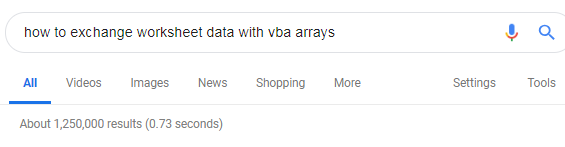
This statistic is frustrating because it shows that there is a whole universe of results out there but only the smallest fraction of results is presented for examination.
This frustration has motivated me to develop an Excel-based process that attempts to expand the collection of search results.
The process is built on two main ideas:
Formulate a “Composite Topic Search”
Make use of the Google Search Engine for both “All” and “Image” search choices. This new process supersedes the original GISP reported earlier.
A “Composite Topic Search” is a search that starts with a collection of search phrases that explore various aspect of the topic of interest. The individual search results are then collected and organized into a composite report.
Making the individual search using both the Google All Search and Google Image Search Engines gives an expanded collection of results.
I have joined these ideas together into what I call the Topic Search Report Processor (TSRP)
The TSRP begins by preparing an Excel Workbook that contains a collection of search phrases or search strings that capture the essence of the desired Topic. A preliminary set of search strings can be extracted from Google.
For example, consider the following topic: how to exchange worksheet data with VBA arrays
After the search string is entered into the Google search box, Google will sometimes display a collection of searches that complement the original search.
Here is a screenshot of the suggested searches:
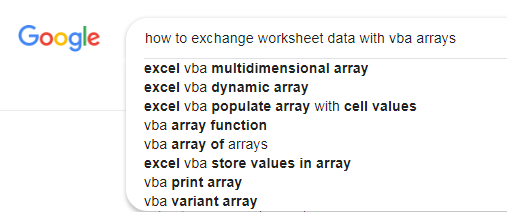
Using a screen capture tool to copy this list as an image, one can then take advantage of the OCR functionality that is built into Microsoft One Note 2016
OCR capabilities are also available within the GreenShot freeware utility. ( http://getgreenshot.org/)
Before describing the details of the GISP Reports, there are two terms that need to be defined.
A Direct URL is a URL captured by GISP, pointing directly to the web page that was discovered by GISP.
A Primary URL is the leftmost part of a Direct URL with the html prefix HTTPS:// or HTTP:// removed.
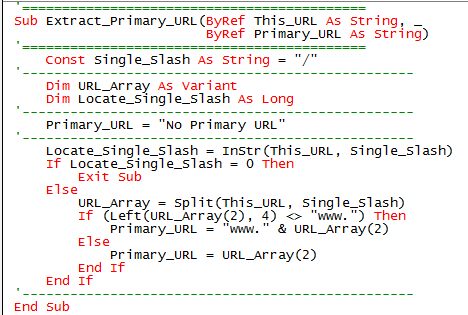
The VBA code to extract a Primary URL from a Direct URL is as follows:
The Search String Counts report shows the effectiveness of each search string.
Note – the information shown here is from an earlier effort that does not reflect the integration of searching Google “All” and Google “Image”
This Topic Search returned 172 Primary URLs.
The first page of the Search String Counts report is shown here.
All counts greater than or equal to 5 are highlighted.
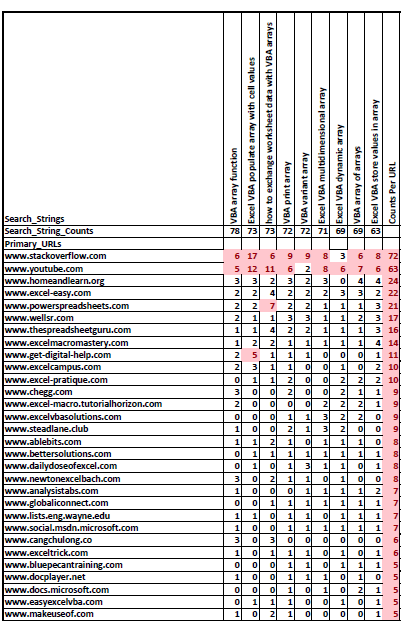
The three main features of this report are:
For example:
Since the report is presented as a PDF, each URL reported is a hyperlink.
Clicking on the URL will then open your browser to the web page.
Note that not all the Primary URLs will link back to a web page, it all depends on the setup of the web site.
The Direct URLs report show the full URL with the different search strings that returned the URL.
The list of Direct URLs is sorted to follow the Rank of the Primary URLs.
This Topic search returned 399 URLs.
The first few rows of the Direct URLs report are shown here:
The combined titles are most important when reviewing the YOUTUBE URLs.

Both reports were exported from the GISP Composite Topic Search Report Workbook. This workbook can be used to generate other customized reports.

Motivation
When executing a Google search, one is presented with a statistic that reports the number of results that were found and the time it took to find them. For example:
This statistic is frustrating because it shows that there is a whole universe of results out there but only the smallest fraction of results is presented for examination.
GISP Google Image Search Processor
This frustration has motivated me to develop an Excel/VBA process that attempts to expand the collection of search results.
The process is built on two main ideas:
Formulate a “Composite Topic Search”
Make use of the Google Image Search Engine.
A “Composite Topic Search” is a search that starts with a collection of search phrases exploring various aspect of the topic of interest. The individual search results are collected and organized into a composite report.
Making the individual searches using the Google Image Search Engine returns an interesting collection of results.
I have joined these two ideas together into the Google Image Search Processor (GISP).
How to start GISP – the Topic Search Workbook
GISP begins by preparing an Excel Workbook containing a collection of search phrases that capture the essence of the desired Topic. A preliminary set of search strings can be extracted from Google.
For example, consider the following topic:
how to exchange worksheet data with VBA arrays
After the search string is entered into the Google search box, Google can then display a collection of suggested searches complementing the original search. For example:
Using a screen capture tool to copy this list as an image, one can then take advantage of the OCR functionality that is built into Microsoft One Note 2016 to extract the list as text.
OCR capabilities are also available within the GreenShot freeware utility. (http://getgreenshot.org/)
The GISP Input Workbook for this topic search looks like this:

Note the report title must not duplicate the search string.
Note also the search strings shown here could have used advanced Google search constructions.
GISP Reports
Two Important Definitions
Before describing the details of the GISP Reports, there are two terms that need to be defined.
A Direct URL is a URL collected by GISP pointing directly to the web page that was discovered by GISP.
A Primary URL is the leftmost part of a Direct URL with the HTML prefix HTTPS:// or HTTP:// removed.
The VBA code to extract a Primary URL from a Direct URL is as follows:
Reporting Search String Counts
The Search String Counts report shows the effectiveness of each search string.
Link to Search String Counts Report
This Topic Search returned 172 Primary URLs.
The first page of the Search String Counts report is shown here.
All counts greater than or equal to 5 are highlighted.
The three main features of this report are:
For example some new resources:
Since the report is presented as a PDF, each URL reported is a hyperlink.
Clicking on the URL will then open your browser to the web page.
Note that not all the Primary URLs will link back to a web page, it depends on the setup of the web site.
Reporting Direct URLs
The Direct URLs report show the full URL with the different search strings that returned the URL.
Link to the Direct URLs Report
The list of Direct URLs is sorted to follow the list of the Primary URLs.
This Topic search returned 399 URLs.
The first few rows of the Direct URLs report are shown here:
Each Direct is reported along with the Search Strings associated with the URL as well as the title of the web page.
Note the web pages titles are most important when reviewing the YOUTUBE URLs.
Both reports were exported from the GISP Composite Topic Search Report Workbook. This workbook can be used to generate other customized reports.
Look for my POST the introduces GISP – Google Image Search Processor
A sample of my view of VBA Source Code.
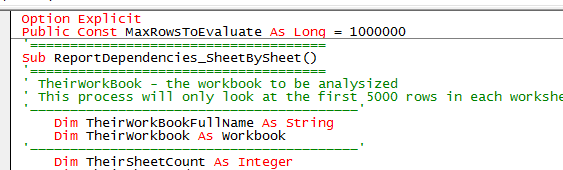
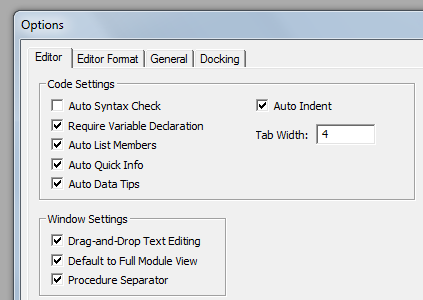
Always enable Require Variable Declaration.
Do not enable the automatic syntax checker. It will only interrupt your train of thought while you are working with and manipulating your VBA source code.
To make your code more visible select the Lucida Console (Western) FONT.
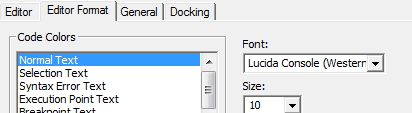
The Lucida Console Western makes it much easier to distinguish:(1;i;I;l;L).
The digit One; the lowercase “eye”; the uppercase “eye”; the lowercase “ell” and the uppercase ‘ell”.
To make the VBA keywords standout display them in RED. RED is far more visible than the default BLUE.
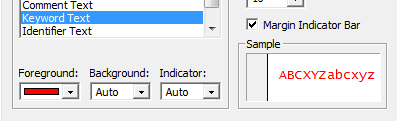
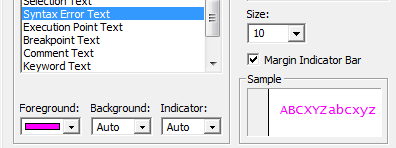
To keep track of syntax errors display them in MAGENTA.
 alfred-excel-vachris